
TAIB-1015
Fault Code 215, Transmission Air Supply Pressure Sensor (TASPS) - Endurant HD, XD, PACCAR TX-12, TX-18
Date: August 8, 2024
Updated: June 2, 2026
Issue Description:
Customers may report transmission service lamp on with the following fault code information:
| Fault Code | SPN | Description | FMI |
|---|---|---|---|
| 215 | 37 | Transmission Air Supply Pressure Sensor | 0, 1, 2, 10, 18, 21 |
Note: This service bulletin only applies to the fault code, SPN and FMIs indicated above.
Affected Models/Population:
MTM Type PS-490, PS-496
| Transmission Model | Model Number | MTM PN | MTM Type |
|---|---|---|---|
| Endurant HD | EEO-xxF112C | A-10004231 | PS-496 |
| EE-xxF111B | |||
| EHD-xxF112C-N | A-10004356 | ||
| EHD-xxF112C-V | |||
| Endurant XD | EXD-xxF118D | A-10003241 | PS-490 |
| EXDP-xxF118D | |||
| EXD-xxF118D-N | |||
| PACCAR TX-12* | PO-xxF112C | A-10004383 | PS-496 |
| PHDP-xxF112C | |||
| PACCAR TX-18* | PXD-XXF118D | A-10004258 | PS-490 |
| PXDP-XXF118D |
*Go to OEM Bulletin Number T024
Verify ServiceRanger Version:
1. Open ServiceRanger, vehicle connection is not required.
2. Go To Settings.
3. Select License.
4. Record ServiceRanger Version: 4.##.####
- If version is less than 4.12, go to RRMT-0041: ServiceRanger 4 Software Upgrade - Download and Install Procedure and update to latest version. Then go to Field Strategy.
- If version is equal to or greater than 4.12, go to Field Strategy.
Field Strategy:
Procedure A - Create a Service Activity Report
- Key on.
- Connect ServiceRanger.
- Create a Service Activity Report.
- Select Send to Eaton (internet connection required).
- Go to Procedure B.
Procedure B - Identify MTM Type:
Identify MTM information with ServiceRanger:
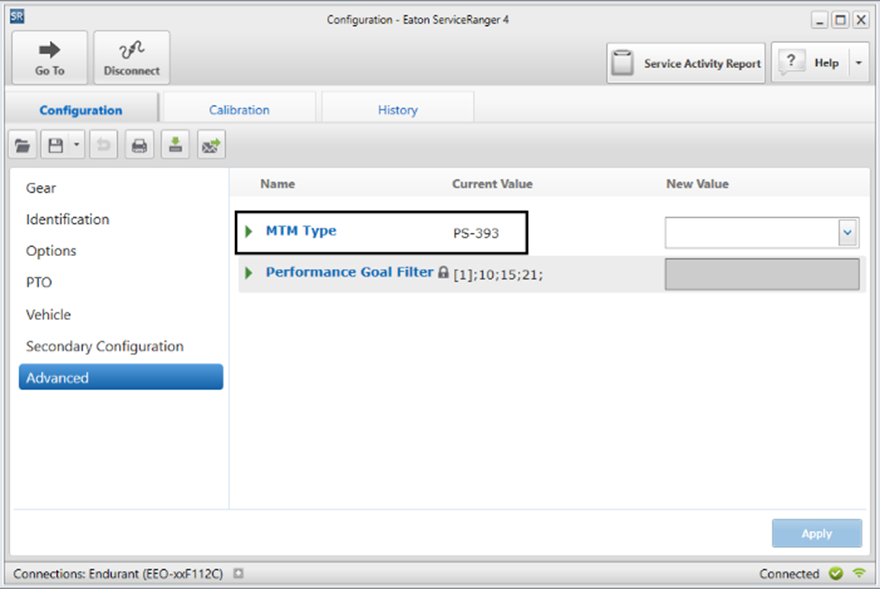
- Select “Configuration”.
- Select “Advanced” and record MTM Type - Current Value:
Note: If “Advanced” is not indicated, transmission is equipped with MTM Type PS-393.
- Compare MTM Type in table:
| MTM Type | Action |
|---|---|
| PS-393 | This service bulletin does not apply. Go to the respective transmission model troubleshooting guide and complete Fault Code Isolation Procedure: Endurant HD, TRTS0950. |
| PS-490 | Go to Procedure C. |
| PS-496 |
- or -
Identify MTM with MTM Parts Label:
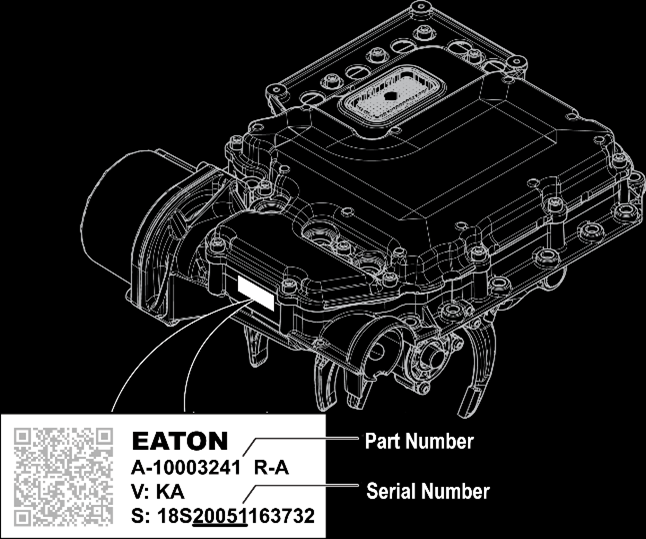
1. Record MTM Part Number and Serial Number.
| MTM Part Number |
2. Compare MTM Part Number in table:
| MTM Part Number | MTM Type | Action |
|---|---|---|
| A-10000715 | PS-393 | This service bulletin does not apply. Go to the respective transmission model troubleshooting guide and complete Fault Code Isolation Procedure: Endurant HD, TRTS0950 or Endurant XD, TRTS0960. |
| A-10004202 | ||
| A-10002594 | ||
| A-10004231 | PS-496 | Go to Procedure C. |
| A-10004356 | ||
| A-10004383 | ||
| A-10003241 | PS-490 | |
| A-10004258 |
Procedure C - Confirm the vehicle air system is functioning properly:
- Key on with engine running.
- Allow vehicle air pressure to build to governor cut-out.
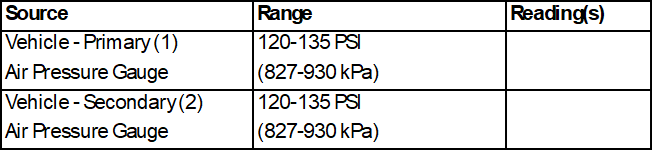
- On the Vehicle Dash Display, monitor Primary (1) and Secondary (2) Air Pressure Gauges and record readings in table.
- If any readings are out-of-range, refer to OEM and/or vehicle air system manufacture regarding system operation and diagnostics.
- If both readings are in-range, go to Procedure D.
Procedure D:
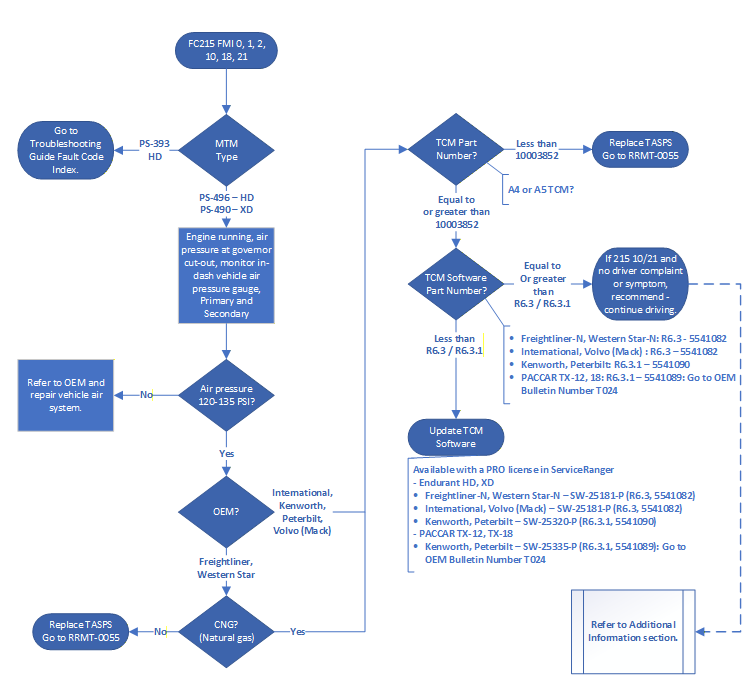
1. Based on OEM, determine next step.
- If OEM is International, Kenworth, Peterbilt or Volvo (Mack), go to Step 2.
- If OEM is Freightliner or Western Star, go to Procedure F.
2. Key on with engine off.
3. Connect ServiceRanger.
4. Go To Programming.
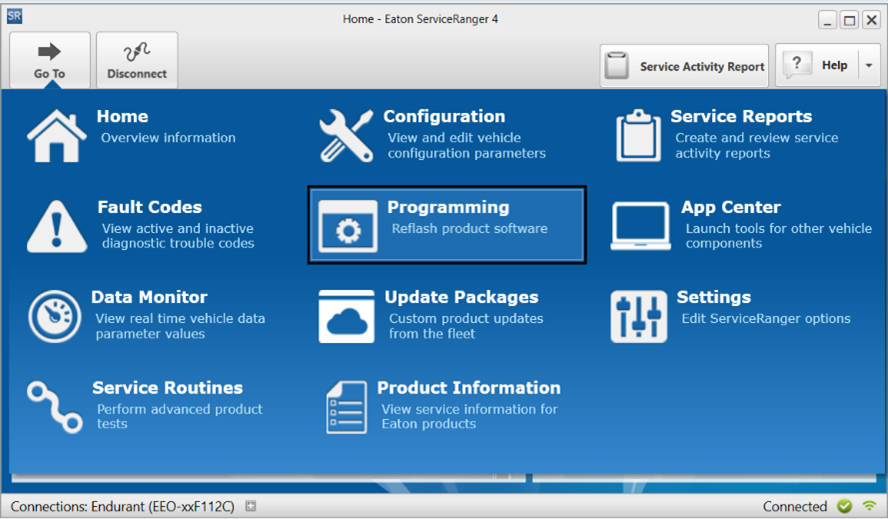
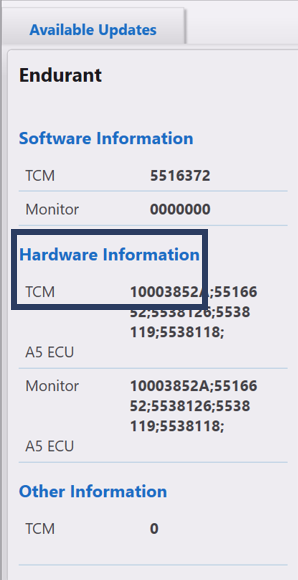
5. Under Hardware Information, record TCM part number:
- If TCM part number is equal to or greater than 10003852, go to Step 6.
- If TCM part number is less than 10003852, go to RRMT-0055: Transmission Air Supply Pressure Sensor (TASPS) Replacement Service Procedure - Endurant HD, XD and PACCAR TX-12, TX-18.
| TCM Part Number |
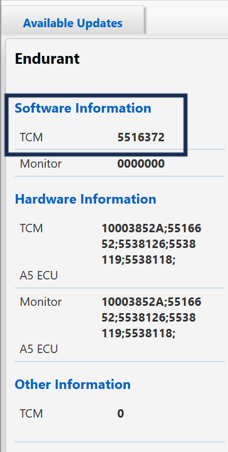
6. Under Software Information, record TCM software part number in table.
| TCM Software Part Number |
7. Compare the Transmission Model, OEM and TCM software part recorded in Step 6 with Software part number in table below.
- If TCM software part number is less than part number in table below, go to Step 8.
- If TCM software part number is equal to or greater than part number in table below and ServiceRanger indicates 215 FMI 10 and/or 21 - This indicates the TCM is using the reported air pressure information from other vehicle sources to verify sufficient air pressure is available for normal transmission operation. No further action is required. See Additional Information section.
| Transmission Model | OEM | Software Part Number |
|---|---|---|
| Endurant HD, XD | International | 5541082 (R6.3) |
| Volvo (Mack) | ||
| Kenworth | 5541090 (R6.3.1) | |
| Peterbilt | ||
| PACCAR TX-12, TX-18 | Kenworth | 5541089 (R6.3.1) OEM Part Number: 2598011 |
| Peterbilt |
8. Based on Transmission Model, determine next step.
- If Endurant HD or XD, go to Procedure E.
- If PACCAR TX-12 or TX-18, go to OEM Bulletin Number T024: PACCAR TX-12 and TX-18 Transmission Air Supply Pressure Sensor Software Update R6.3.1.
Procedure E:
1. Compare the OEM in the table below and determine the Available Updates software package.
In the ServiceRanger Programming screen:
- From the Available Updates, select the software package.
- Select “Confirm” and follow on-screen prompts. Process complete.
| Transmission Model | OEM | Available Updates Software Package |
|---|---|---|
| Endurant HD, XD | International | SW-25181-P (R6.3, 5541082) |
| Volvo (Mack) | ||
| Kenworth | SW-25320-P (R6.3.1, 5541090) | |
| Peterbilt |
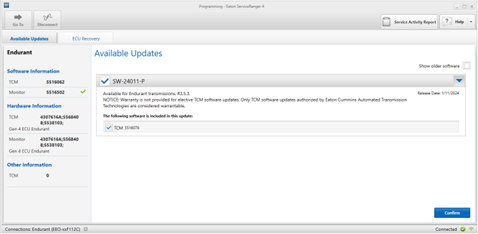
Note: After the TCM software update, ServiceRanger may indicate 215 FMI 10 and/or 21. This indicates the TCM is using the reported air pressure information from other vehicle sources to verify sufficient air pressure is available for normal transmission operation. No further action is required. See Additional Information section.
Procedure F:
1. Based on Transmission Model, determine next step.
- If model is -N (natural gas), go to Step 2.
- If model is not -N (natural gas), go to RRMT-0055: Transmission Air Supply Pressure Sensor (TASPS) Replacement Service Procedure - Endurant HD, XD and PACCAR TX-12, TX-18 and replace TASPS.
| Transmission Model | Model Number |
|---|---|
| Endurant HD | EEO-xxF112C |
| EE-xxF111B | |
| EHD-xxF112C-N | |
| EHD-xxF112C-V | |
| Endurant XD | EXD-xxF118D |
| EXDP-xxF118D | |
| EXD-xxF118D-N |
2. Key on with engine off.
3. Connect ServiceRanger.
4. Go To Programming.
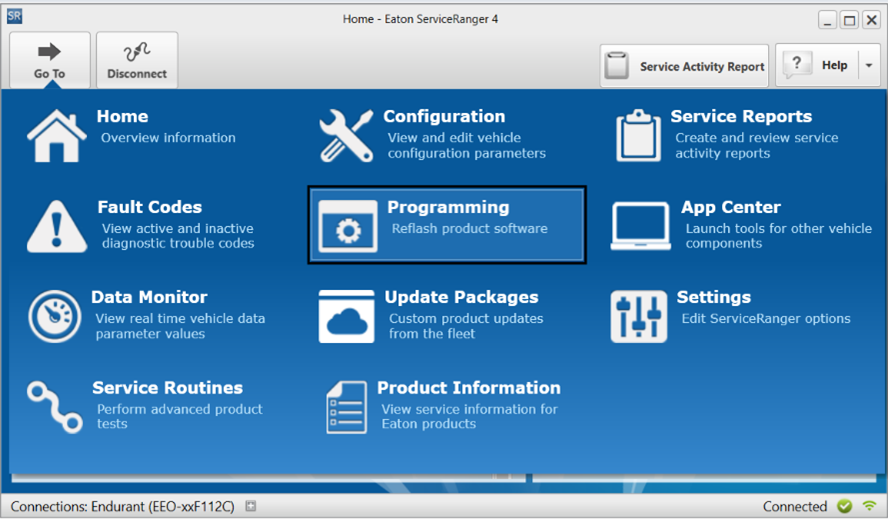
5. Under Hardware Information, record TCM part number:
- If TCM part number is equal to or greater than 10003852, go to Step 6.
- If TCM part number is less than 10003852, go to RRMT-0055: Transmission Air Supply Pressure Sensor (TASPS) Replacement Service Procedure - Endurant HD, XD and PACCAR TX-12, TX-18 and replace TASPS.
| TCM Part Number |
|---|
6. Under Software Information, record TCM software part number in table.
- If TCM software part number is less than 5541082 (R6.3), go to Step 7.
- If TCM software part number is equal to or greater than 5541082 (R6.3) and ServiceRanger indicates 215 FMI 10 and/or 21 - This indicates the TCM is using the reported air pressure information from other vehicle sources to verify sufficient air pressure is available for normal transmission operation. No further action is required. See Additional Information section.
| TCM Part Number |
|---|
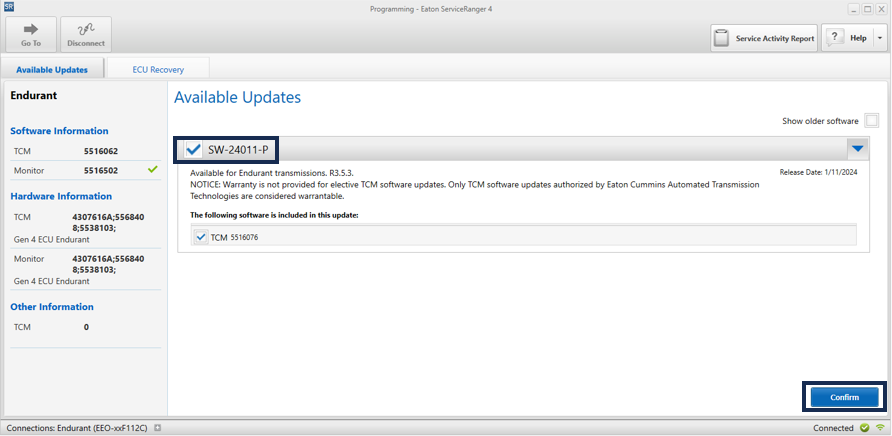
7. In the ServiceRanger Programming screen:
- From the Available Updates, select the software package.
- Select “Confirm” and follow on-screen prompts. Process complete.
| Transmission Model | OEM | Available Updates Software Package |
|---|---|---|
| Endurant HD-N, XD-N | Freightliner | SW-25181-P (R6.3, 5541082) |
| Western Star |
Note: After the TCM software update, ServiceRanger may indicate 215 FMI 10 and/or 21. This indicates the TCM is using the reported air pressure information from other vehicle sources to verify sufficient air pressure is available for normal transmission operation. No further action is required. See Additional Information section.
Additional Information:
For MTM Type PS-496 equipped with TCM software version 5541082 or higher. FMIs 2, 10, and 21 may become active to indicate that the TCM is utilizing the vehicle-reported air pressure data to confirm sufficient air pressure is available for normal transmission operation. While this logic is being applied, the driver may observe a brief transmission low air message. FMI 1 and FMI 18 will continue to activate if the vehicle’s air supply pressure falls below the normal operating range: 75 PSI (517 kPa) for FMI 1 and 80 PSU (552 kPa) for FMI 18.
Driver Information:
This software is designed to maintain transmission operation and prevents a towing event when the TASPS reports an issue. Drivers may observe a brief air message, and the transmission may hold its current gear until vehicle-reported air pressure reaches 110 PSI (758 kPa). Please continue operating the vehicle and allow the air pressure to reach 110 PSI (758 kPa).
- If the TASPS reports an erratic or higher than expected rate of pressure change during initial startup or while driving, the TCM monitors vehicle-reported air supply pressure to ensure consistent and sufficient air pressure is available for normal transmission operation throughout the rest of the key cycle. FMI 2 or 10 is set active with no lamp.
- If the TASPS reports low air pressure at initial startup, the corresponding low air pressure sensor FMI 1 and 18 becomes active but will not broadcast until a gear selection is made by the driver. If the TASPS continues to indicate low pressure and vehicle-reported air supply pressure reaches 110 PSI (758 kPa), the TCM will open and close the clutch confirming sufficient air pressure is available for normal transmission operation throughout the rest of the key cycle. FMI 21 is set active with no lamp, and low air goes inactive.
- If the TASPS reports low air pressure while driving, the low air pressure sensor FMI 1 or 18 activates and may indicate a transmission low air message. The TCM maintains the current gear and monitors the vehicle-reported air supply pressure. When the pressure reaches 110 PSI (758 kPa), the TCM monitors the next downshift to ensure the clutch can successfully open and close confirming sufficient air pressure is available for normal transmission operation throughout the rest of the key cycle. FMI 21 is set active with no lamp, and low air goes inactive.
Warranty Information:
Warranty Parts:
- No parts
Warranty Labor (ECWY3000):
- TCM Software Update:
- Diagnostics (Up to 1.0 hour)
- Software Update (Up to 0.3 hour)
- Verify Repair Road Test (Up to 0.3 hour)
General Claim Coding
TCM software update only:
- Line Item tab - Repair Line List
- Primary Casual Part #: 10005053 (SENSOR, AIR PRESSURE)
- Secondary Casual Part #: N/A
- Complaint Code: Varies
- Failure Mode Description: AIR PRESSURE SENSOR-APS-READING INCORRECT PRESSURE (TFM-0538)
- Responsibility Code:
- RTW COMMITMENT (601) for RTW claims
- Vendor Part (418) for all others
- Part Return Instructions: Per OEM or RTW Instructions
Change Log
| Date | Description |
|---|---|
| 06/02/2026 | Updated Affected Models section to point to OEM Bulletin T024. Updated Process Flow. |
| 05/06/2026 | Updated Procedure C and Process Flow. |
| 04/20/2026 | Added Additional Information section. |
| 02/20/2026 | Updated Field Strategy to update software on Freightliner and Western Star HD-N (natural gas) transmission models. |
| 01/15/2026 | Updated Field Strategy Procedure D and Process Flow. |
| 12/17/2025 | Added steps to verify SR4 version, updated Procedure D and Process Flow. |
| 12/04/2025 | Updated Issue Description, Affected Models, Service Strategy and Warranty sections. Removed TASPS replacement process, moved to RRMT-0055. |
| 09/02/2025 | Updated Affected Models, Service Strategy Section, Procedures B and C. |
| 03/11/2025 | Updated Field Strategy with new MTM serial numbers. |
| 02/17/2025 | Updated Warranty Labor section. |
| 08/08/2024 | Updated affected MTM serial numbers and Field Strategy. |
| 08/07/2024 | Converted RRMT to Service Bulletin. |
The material contained in this bulletin is product improvement information. Eaton Corporation is not committed to, or liable for, canvassing existing products.
FSUD: 4552